
SMALL-TEAM HVAC · OWNER & BOOKKEEPER GUIDE
Best HVAC Invoicing Software in 2026: Get Paid Without Making Month-End a Mess

The repair is finished and the customer is ready to pay. But the invoice is held up: a part is missing, a deposit is unaccounted for, or nobody knows if a bill was already sent.
For a small HVAC company, that delay means money waiting to be collected.
I judge invoicing software on three things: Bill promptly, track what is owed, and reconcile payments without rebuilding the numbers by hand.
Disclosure: We use regular official product links below; any future affiliate links will be disclosed. We do not alter recommendations for partnerships. Affiliate disclosure.
Quick Answer: choose by how your company gets paid
For installation work with deposits and more than one bill per job, trial Jobber first. In our hands-on test, one Jobber job could produce separate invoice records. That matters when a customer pays at different project milestones. But we also recorded an important control weakness: a manually entered payment above the invoice balance was accepted in our tested setup. Your office needs a check on manual entries.
For mostly one-visit repairs, trial Housecall Pro first. It handled the basic job-to-invoice flow cleanly in our test and rejected a manual payment that exceeded the remaining invoice balance. Its documented Progress Invoicing feature may also handle staged bills, but confirm the feature is enabled on the exact plan you are buying.
For a lower budget, consider Kickserv or ServiceM8—but neither has a matching low-tier invoicing test. Workiz is a collections-automation demo candidate, supported here by documentation rather than hands-on evidence.
Do not switch because a product advertises “automated invoicing.” Switch when it solves a collection or reconciliation problem your team can demonstrate.
The owner's comparison: where can money get stuck?
| Your business problem | Start with | Evidence we actually have | What finance must verify |
|---|---|---|---|
| Deposits and several bills for one installation | Jobber; compare HCP Progress Invoicing | Jobber multi-invoice hands-on; HCP newer vendor documentation | Separate invoice numbers, balance allocation, edits and credits |
| One repair, one invoice, payment before the customer leaves | Housecall Pro | Hands-on invoice revision and manual payment cap | Delivery, payment status, receipt and end-of-day settlement |
| Subscription budget matters more than complex billing | Kickserv or ServiceM8 | Kickserv Premium trial; ServiceM8 product documentation | Exact purchased tier, job allowance and payment fees |
| Office spends too much time chasing unpaid bills | Workiz demo | Vendor documentation only | Reminder sequence, opt-outs, plan limits and A/R reporting |
| Accountant needs clean monthly books | Compare your current system against the shortlisted tools | No completed end-to-end accounting reconciliation benchmark | QuickBooks mapping, duplicates, refunds, taxes and export |
The cheapest plan is not cheap if it creates extra bookkeeping.
How we tested — and what we did not
We tested Jobber and Housecall Pro through quote, job, invoice and payment tasks, including edits, multiple invoices and manual payment controls. Results apply to our test accounts, not every tier.
Our methodology uses a three-person workflow; quoted prices can cover five users. We did not verify live card settlement, complete bank reconciliation or a matched five-vendor invoice test. Kickserv was tested on Premium, ServiceM8 only partially, and Workiz via documentation.
Prices and vendor documentation below reflect the October 27, 2026 research snapshot; recheck the live checkout terms before publication or purchase.
1. Jobber: better starting point for a business that bills in stages
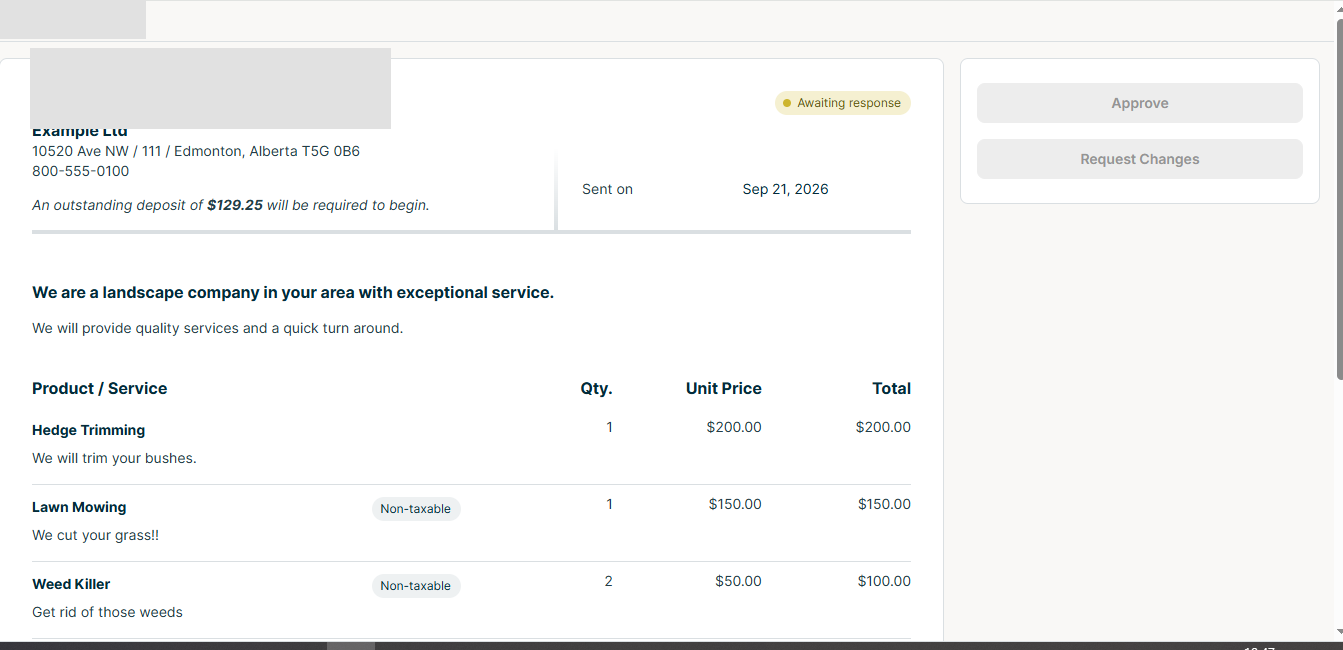
On an installation with a deposit, milestone and final bill, the owner needs to see what has been invoiced, what has cleared and what remains due—not three disconnected payment links.
Jobber created multiple invoices from one job in our test. Its invoice basics and progress billing guide describe further options we have not fully retested.
One control needs attention: our test accepted a manual payment above the invoice balance. That is not a universal finding, but manual cash and check entries warrant reconciliation.
Owner's decision: Start here if you routinely bill in stages. Ask finance to trace one job through invoices, partial payments, final balance and credit.
Price to verify: Jobber Connect was recorded at $149/month equivalent with annual billing for five users, $169/month with a one-year commitment paid monthly, or $199/month without commitment. These are different financial obligations, not three interchangeable monthly prices. Official pricing.
2. Housecall Pro: a practical trial for service calls and payment control
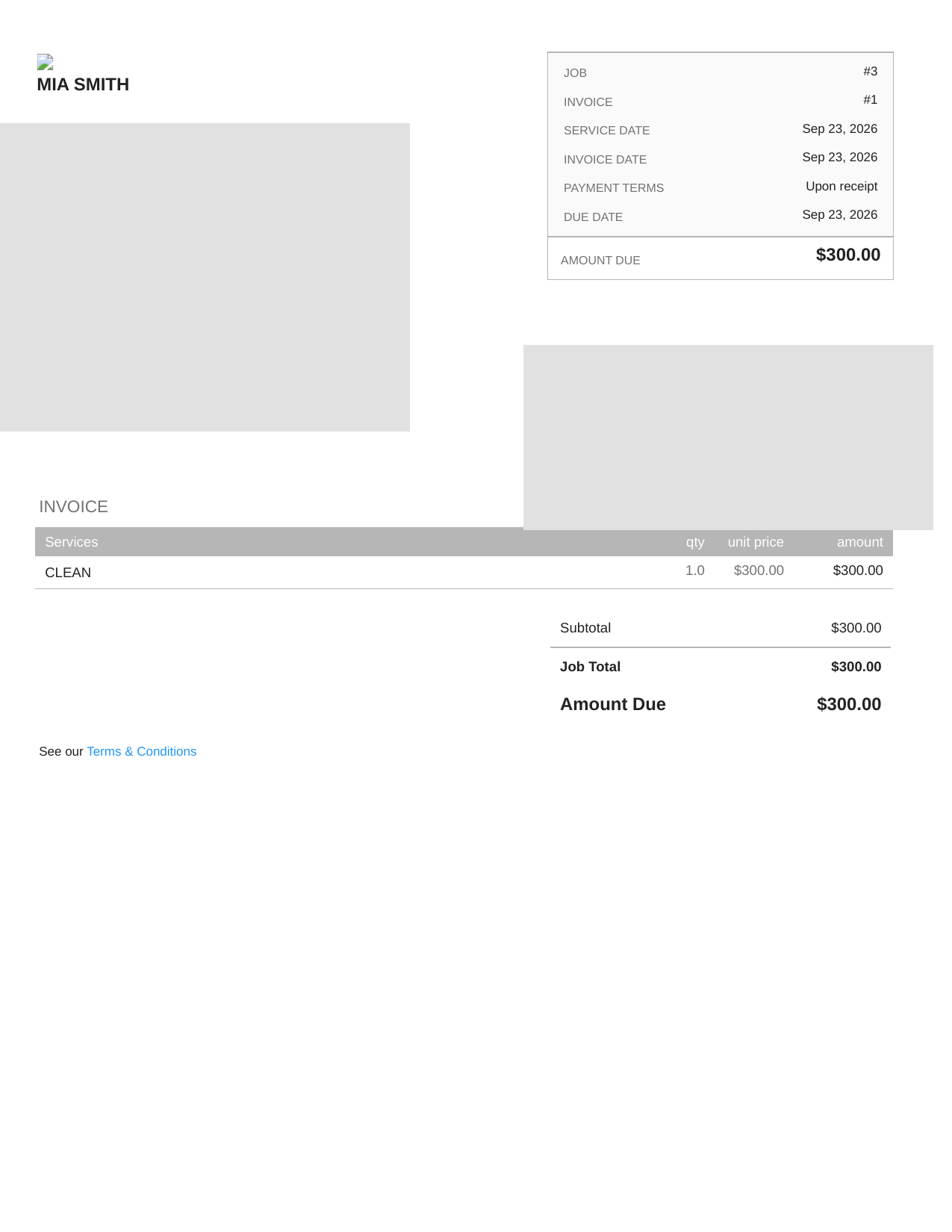
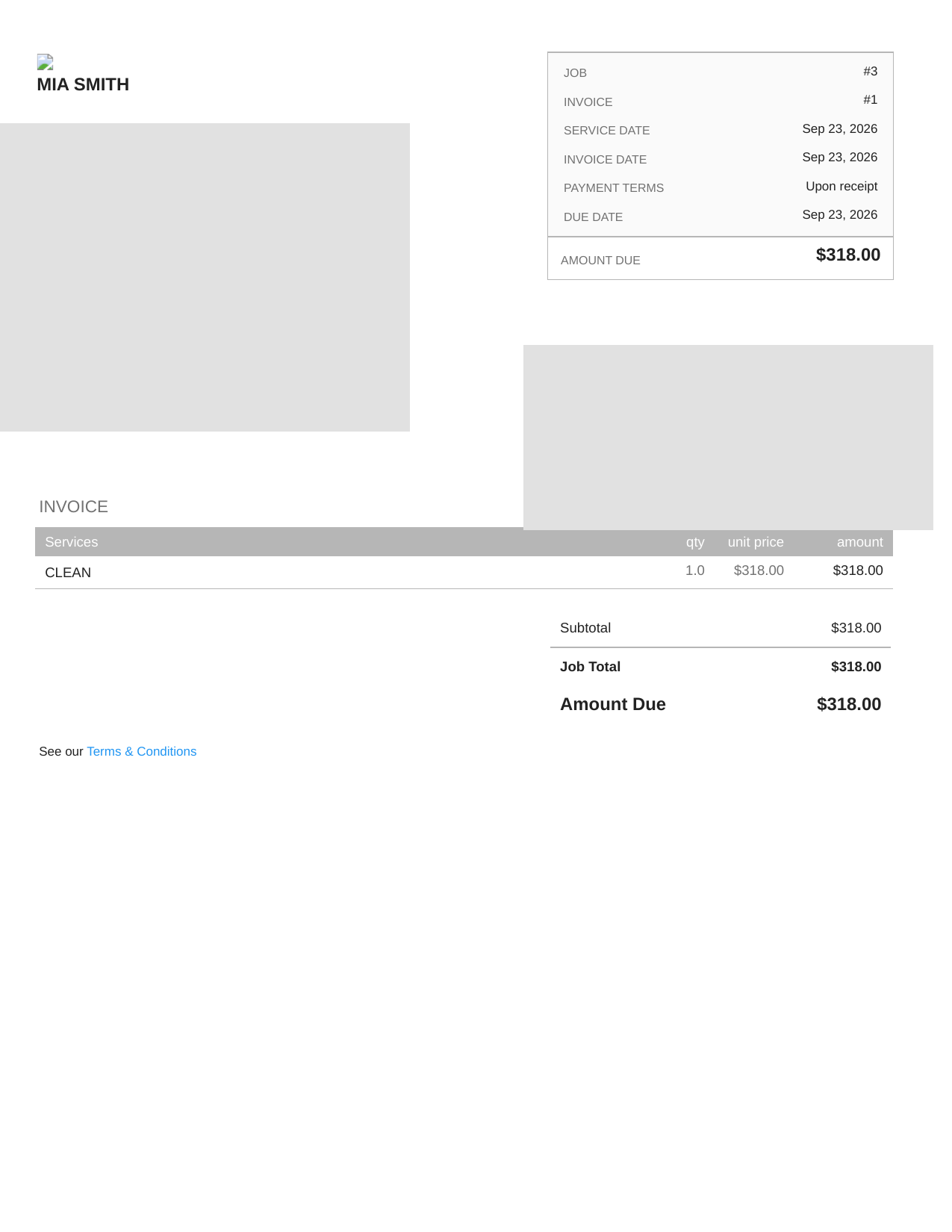
For mostly repair calls, the question is simpler: Can the office issue one correct invoice and record payment once?
Our test revised a $300 job to $318; the existing invoice number was updated. A manual overpayment was blocked. Both behaviors matter for routine repair billing.
There is an important qualification. Housecall Pro's Progress Invoicing documentation, dated July 9, 2026, describes separate stage invoices. So our earlier observation does not mean Housecall Pro cannot handle progress billing. Availability, enablement and some editing functions need confirmation for the actual account and plan.
Owner's decision: Trial Housecall Pro first for high-volume, one-visit repairs. For installation work, ask for a live demonstration of deposit, milestone, final invoice, later correction and the resulting customer balance. Do not accept a feature-list checkbox as proof.
Price to verify: Standard Essentials was listed at $149/month billed annually or $189/month billed monthly for five users. HVAC-specific packages can have different terms. Official pricing.
3. Kickserv: lower software spend only helps if the purchased tier works
A cheaper platform makes sense only if the office does not need extra spreadsheets, corrections and manual follow-up to use it.
Our Kickserv Premium trial showed an approachable estimate-to-job flow, but did not establish Start-tier invoicing or integration parity.
Owner's decision: Ask for the Start plan, not a Premium demo. Have the office create an invoice, edit it, apply a deposit, record a partial payment, issue a credit and show the remaining balance. Confirm whether QuickBooks sync and reminder features are actually included.
Price to verify: The October 27 research found a displayed Start price around $60/month for five users, but the annual/monthly toggle and renewal terms still require confirmation. Official pricing.
4. ServiceM8: check the job allowance before celebrating the price
For a high-volume repair shop, ServiceM8's monthly new-job allowance may matter more than seat count.
Its U.S. pricing page listed Starter at $29/month with 50 new jobs and Growing at $79/month with 150, with unlimited users on those plans. Vendor materials list deposits and partial or progress invoices. We have not performed a matched end-to-end invoice, payment and reconciliation test.
Owner's decision: Count actual new jobs from a typical month, not just the number of technicians. Then ask what happens at the allowance and how payments, credits, sales tax and accounting exports behave. A $29 headline is not a proven all-in billing cost.
5. Workiz: consider it if the office is collecting too slowly
If the office cannot see overdue balances and follow-ups, a fancier invoice editor will not solve collections.
Workiz documents payments and reminder automation. We have not tested plan access, reminder reliability or collection results.
Owner's decision: Request a demo using a fictional overdue invoice. Watch who receives the reminder, how the office sees the follow-up history, what happens after a partial payment and whether another reminder is suppressed after the balance is cleared.
Price to verify: Request a written five-user quote including phone features, automation limits, payment fees, onboarding and renewal terms. Do not compare an unverified promotional price with another vendor's committed team price.
Four checks your bookkeeper should do before the owner signs
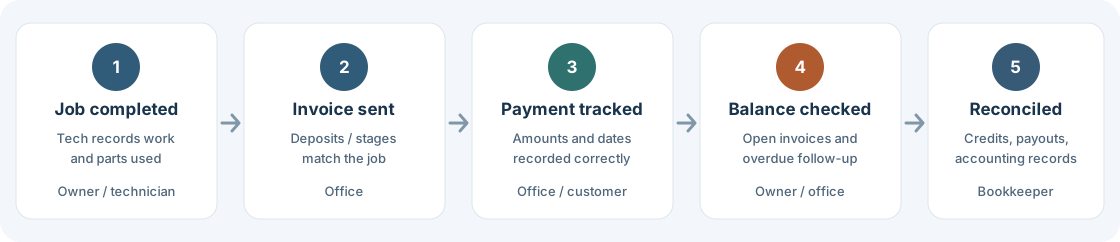
1. Does the job total tie to what was invoiced and paid?
Use a fictional $4,800 installation. Trace the approved quote, deposit, stages, payments and outstanding balance without a spreadsheet.
2. Can staff correct mistakes without hiding the audit trail?
Edit a sent invoice, then test a partial payment, overpayment, void and credit. Check permissions and audit history. Use test data, not real charges.
3. Can finance see and work the unpaid balance?
Ask for an accounts-receivable aging report or an equivalent view of open invoices and their due dates. Can the office tell what is unpaid, what is disputed and who last contacted the customer? A “paid/unpaid” badge alone may not be enough.
4. Does month-end reconcile cleanly?
Export sample invoices, payments, taxes, refunds and customer balances. If you use QuickBooks, have your bookkeeper verify how the records map and whether edits produce duplicates. An advertised integration does not prove accurate reconciliation, and invoicing software does not replace bookkeeping judgment.
What does the subscription really cost the business?
Calculate first-year subscription, add-ons, payment fees, seats, job caps, setup and bookkeeping time. Measure fewer unbilled jobs and quicker invoicing rather than assuming a marketing claim becomes cash.
Try the workflow before buying an annual contract. Automation claims are not proof of better collections.
Questions I would ask before buying
Is Jobber automatically better for progress billing?
No. It is the first product I would trial because our test confirmed separate invoices from one job. Housecall Pro now documents Progress Invoicing too. Compare both on the precise stage-billing workflow you need.
Which product is safer for manual payment entry?
Housecall Pro rejected an overpayment in our tested workflow; Jobber allowed one manual over-entry in its tested setup. These are limited observations, not universal security guarantees. Test the current account and implement approval and reconciliation controls either way.
Is the cheapest plan enough for a five-person shop?
Maybe. First verify job volume, feature entitlements, payment fees and accounting integration. A low seat price can hide a higher operating cost if the team needs another plan or manual workarounds.
Should I change systems if the current invoicing process works?
Not without a measurable reason. Switching can disturb outstanding balances, customer payment history and staff routines. Export a sample of open invoices and test the migration before replacing a working process.
Bottom line
Trial Jobber first for staged billing; Housecall Pro first for routine repair invoices. In both cases, let the bookkeeper test the full reconciliation.
Kickserv and ServiceM8 may be good budget candidates once you verify the actual tier. Workiz deserves a look when overdue follow-up, rather than invoice creation, is the bottleneck.
Pick the system that turns finished work into a correct bill and a trustworthy month-end balance.
Photos and software screenshots are illustrative or captured in redacted test environments, not current vendor-interface guarantees.