
Jobber vs Housecall Pro (2026): I Tested 10 HVAC Workflows
I spent three days testing the same five-person HVAC workflow in both tools, including approval changes, technician overlaps, recurring work, invoice revisions, and payment errors.
30-Second Decision
If your office lives in the calendar and values clearer recurring-job scope and a payment-amount guardrail.
If multiple invoices from one job, progress billing, and its quote-to-job structure matter more.
Neither blocked the technician overlaps I deliberately created. Both allowed meaningful changes after customer approval in my tests, so verify your own controls before switching.
Quick comparison
| Area | What I observed |
|---|---|
| Customer creation | Housecall Pro felt cleaner for one-at-a-time entry; Jobber gave clearer bulk-import preparation. |
| Estimate / quote control | Both allow meaningful post-approval changes. HCP warns before editing approved work, but I did not see enforced fresh approval after the change. |
| Scheduling | HCP felt more calendar-first; Jobber had a small convenience edge around start/end-time entry. |
| Technician conflicts | Both allowed overlapping assignments without a prominent hard block in my tests. |
| Recurring work | Both handle one-off vs future-series changes. HCP's edit-scope prompt was especially clear. |
| Invoicing | Jobber supports multiple distinct invoices from one Job; the HCP workflow I tested revised the same live invoice. |
| Payment control | HCP blocked overpayment. Jobber's manual payment recording was more permissive. |
| Reminders | Jobber was easier to verify in trial. HCP SMS reminders required business/texting-number setup. |
| Review requests | HCP basic bulk email requests worked in the trial; Jobber's review workflow was more tied to Marketing Suite. |
- Best for
- A five-person team that needs deposits or staged billing.
- Evidence
- Full hands-on: the same ten HVAC workflows over three days, including recurring jobs, invoicing, and payments.
- Why consider
- Multiple distinct invoices can come from one Job; bulk-import preparation was clearer.
- Watch out
- The calendar felt a step less direct to me. Manual payment entry allowed an amount above the invoice, and approval changes need office controls.
- Takeaway
- Start here when billing structure is the deciding workflow.
- Best for
- An office that works heavily from the dispatch calendar.
- Evidence
- Full hands-on: the same ten HVAC workflows, with original screenshots of approved-work changes, recurring scope, invoices, and payment validation.
- Why consider
- Calendar-first dispatch, a clear one-job-versus-future-jobs choice, and an overpayment block.
- Watch out
- The invoice revision I tested updated the same live Invoice #1; SMS reminders needed business/texting registration. Check the applicable HVAC package.
- Takeaway
- Start here when dispatcher speed and payment guardrails matter more.
What surprised me after three days
HCP felt more direct in the Schedule; Jobber gave me more structure for importing and billing. Neither product was a clear winner across all ten workflows.
Customer setup
HCP was cleaner for one-at-a-time customer entry: a name was enough to save, and the form accepted multiple phone numbers and emails. Jobber's default phone notifications needed care for landlines.
For migration, Jobber gave clearer import preparation. I did not find an obvious HCP template before its spreadsheet-style importer.
Estimates and approvals
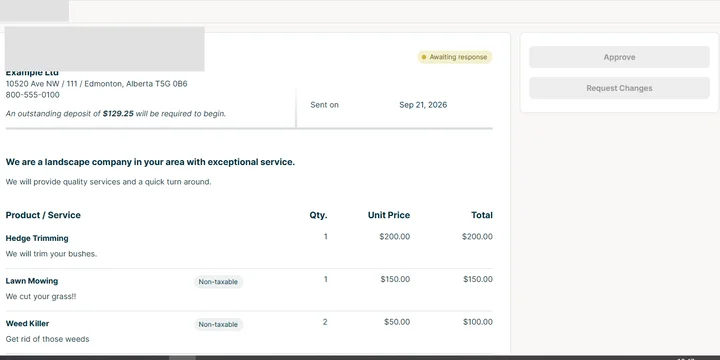
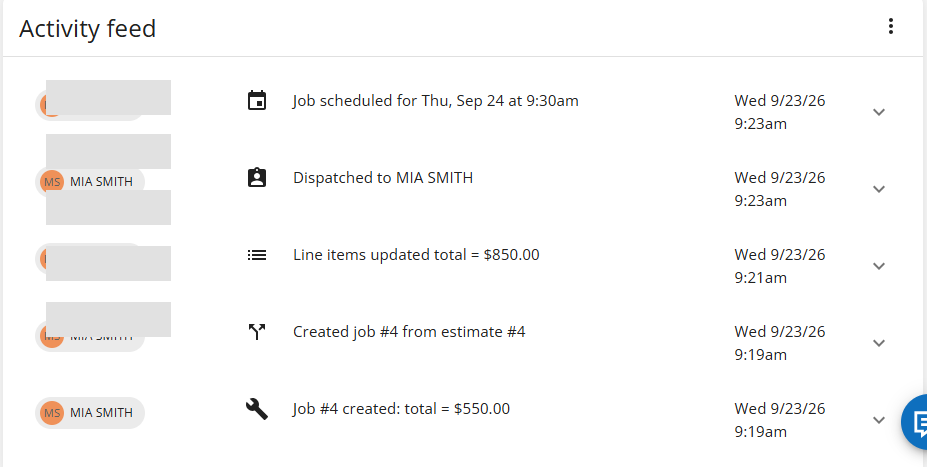
Both products accepted customer approval, but neither acted like strict version-locked contract software in my tests. Jobber let me turn an unapproved quote into a Job and later edit an approved quote.
HCP warned before a material approved-estimate change, then let me change and resend without enforced fresh approval. Use a revised-estimate or change-order process when price or scope changes materially.
Approved-work changes
Housecall Pro warned before a material edit. In my matched test, neither product gave me strict version locking after customer approval.
- HCP: warning before edit
- Both: office controls still matter
See the matching Jobber screenshot + full note
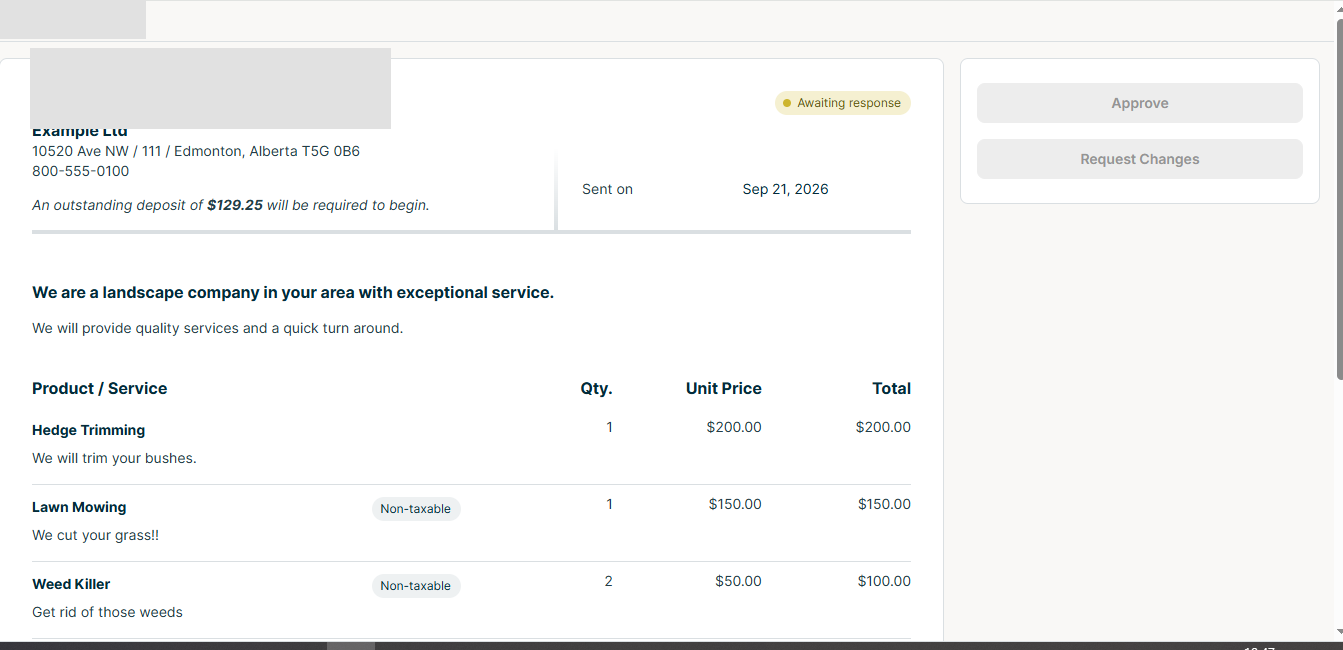
This was one of the moments where I stopped trusting the happy path. HCP gives a warning before a material edit, but neither test gave me strict version locking.
Scheduling and dispatch
HCP put Schedule at the center, with direct creation, drag-and-drop, and customer mapping. Jobber estimated an end time after I entered a start time; HCP required manual end-time selection.
Recurring work
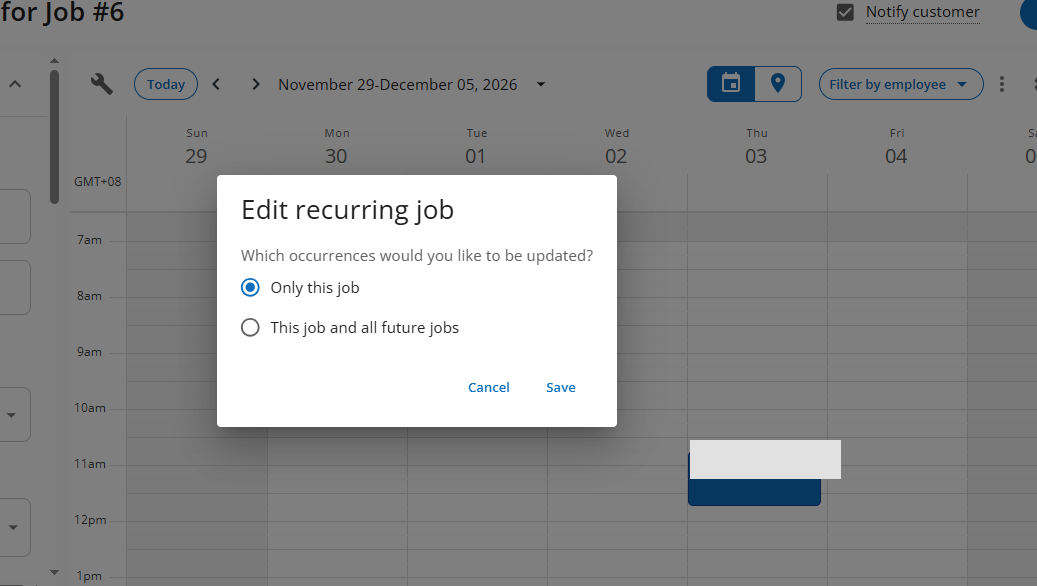
Both supported recurring service and one-off versus future-series changes. HCP's explicit Only this job / This job and all future jobs choice made the edit scope clear.
In my HCP test, I could copy an approved estimate into a normal Job, but not directly into a Recurring Job; that setup had to be rebuilt.
Recurring-service scope
Housecall Pro made the one-job-versus-future-jobs choice unusually clear in my test.
- Clear edit scope
- Useful guardrail for maintenance work
See the matching Jobber recurring-work screenshot
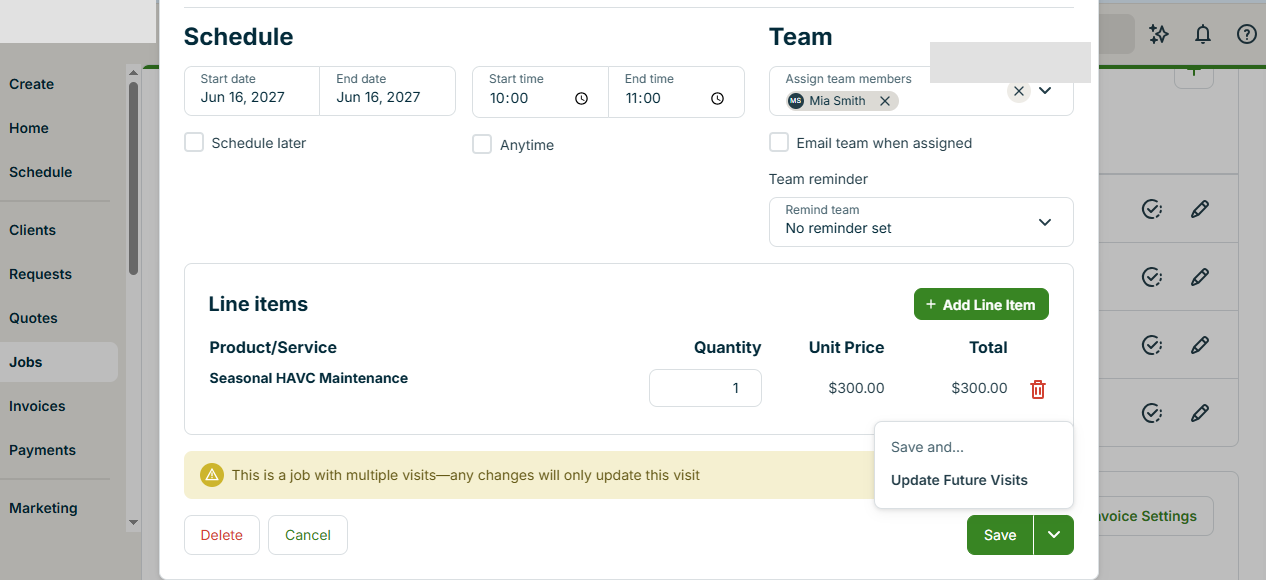
Both platforms supported recurring work; this screenshot shows the matched Jobber setup used in the comparison.
Invoicing
Jobber let me create multiple distinct invoices from one Job, useful for deposits and staged collections. In HCP, changing Job #3 from $300 to $318 and resending kept Invoice #1; the live receivable updated rather than creating another independent invoice.
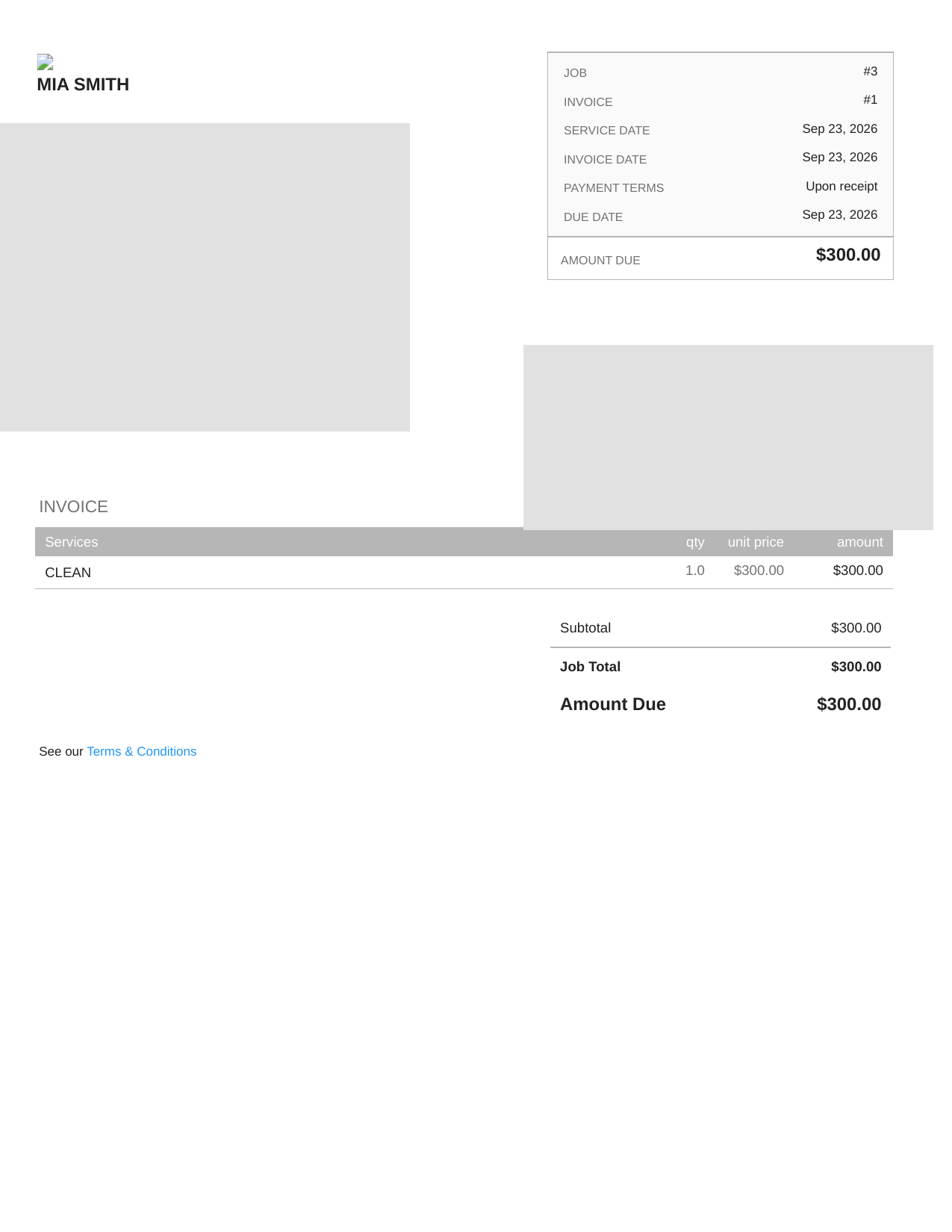
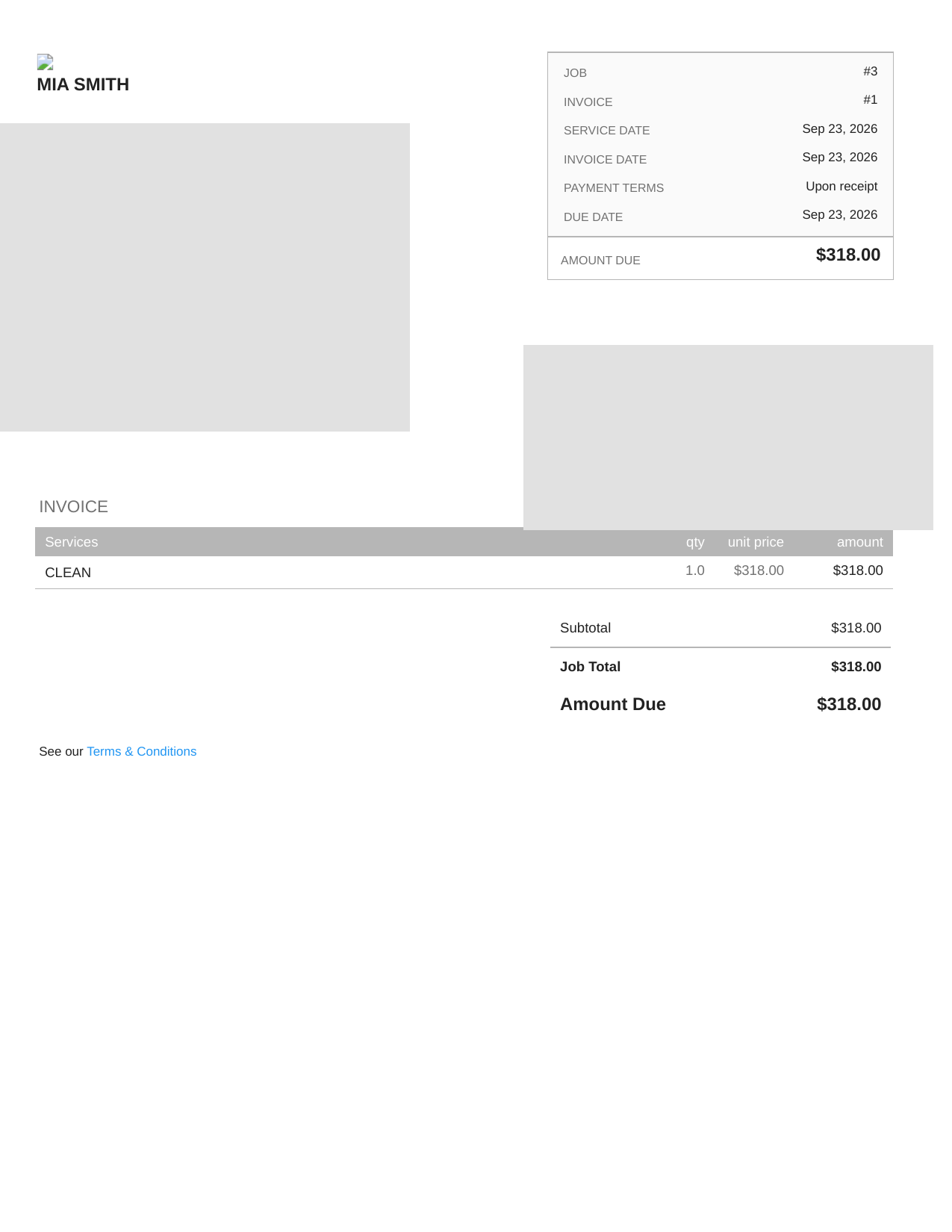
This was the clearest billing difference I found: HCP revised the same live invoice; Jobber supports multiple distinct invoices from one Job.
Payments
HCP supported partial payments and blocked my attempted payment above the remaining balance. Jobber let me record a manual payment above the invoice amount, allowing flexibility for credits or prepayments but requiring more office discipline.
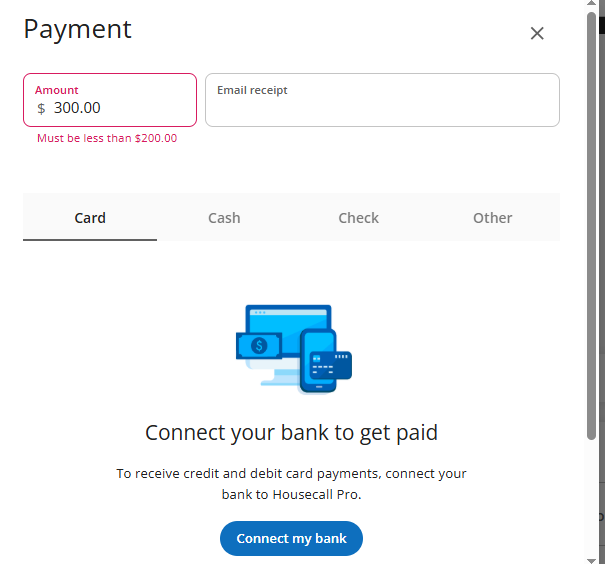
Overpayment control
HCP stopped me when I tried to enter too much. Jobber let me record it. For an owner, I preferred the stronger guardrail.
Reminders and review requests
I could configure Jobber reminders in the trial. HCP had reminder controls, but SMS delivery needed business registration and a texting number, so I could not complete an end-to-end SMS test.
For reviews, HCP's basic bulk email request worked in trial without connecting Google or Facebook. Jobber's review flow was more tied to Marketing Suite.
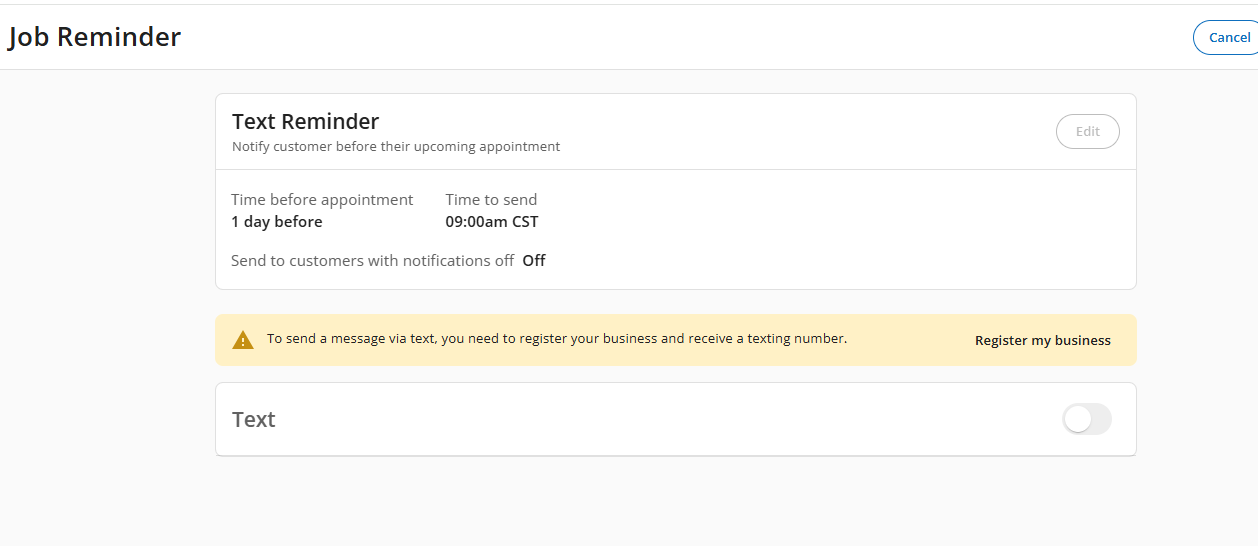
Reminder setup limitation
The feature exists, but I could not honestly claim an end-to-end SMS test without completing the business/texting-number setup.
Pricing: what a 5-person team is looking at
Pricing checked against official vendor pages on October 20, 2026. The temporary Jobber offer shown below is advertised through October 30, 2026; confirm the final checkout price and applicable HCP package before buying.
Jobber
| Plan | Users | No commitment | 1-year commitment | Billed annually |
|---|---|---|---|---|
| Core | 1 | $49/mo | $39/mo | $29/mo |
| Connect | Up to 5 | $199/mo | $169/mo | $149/mo |
| Grow | 5-person tier | $299/mo | $259/mo | $229/mo |
| Plus | 5 | $499/mo | $439/mo | $399/mo |
The table above shows regular prices. “No commitment” is a true month-to-month price; “1-year commitment” is paid monthly with a commitment; “billed annually” is a per-month equivalent paid up front. Prices exclude applicable tax.
| 5-user plan | First year, prepaid | Renewal, prepaid |
|---|---|---|
| Connect | $105/mo equiv. ($1,260) | $149/mo equiv. ($1,788/yr) |
| Grow | $161/mo equiv. ($1,932) | $229/mo equiv. ($2,748/yr) |
| Plus | $280/mo equiv. ($3,360); contact sales | $399/mo equiv. ($4,788/yr) |
Jobber also shows three-month introductory monthly charges: Connect $140 then $199 with no commitment, or $102 then $169 with a one-year commitment; Grow $210 then $299, or $156 then $259, respectively. These offers do not change standard plan prices.
For my five-person scenario, Connect covers reminders, checklists, automatic payments and QuickBooks sync; Grow adds two-way SMS, job costing and automation.
Housecall Pro
| Plan | Included users | Monthly | Billed annually |
|---|---|---|---|
| Basic | 1 | $79/mo | $59/mo |
| Essentials | 5 | $189/mo | $149/mo |
| MAX | 8 | $329/mo | $299/mo |
Current Jobber pricing
Open official pricingCurrent Housecall Pro pricing
Open official pricingPlan-by-plan features that mattered in this test
Show detailed plan feature comparison
| Capability | Jobber Core | Jobber Connect | Jobber Grow | Jobber Plus | HCP Basic | HCP Essentials | HCP MAX |
|---|---|---|---|---|---|---|---|
| CRM / customer records | Yes | Yes | Yes | Yes | Yes | Yes | Yes |
| Scheduling & dispatch | Yes | Yes | Yes | Yes | Yes | Yes | Yes |
| Quotes / estimates | Yes | Yes | Yes | Yes | Yes | Yes | Yes |
| Invoices / payments | Yes | Yes | Yes | Yes | Yes | Yes | Yes |
| Automated client reminders | — | Yes | Yes | Yes | Plan/config dependent | Available | Available |
| QuickBooks Online sync | — | Yes | Yes | Yes | Package/tier dependent | Yes on applicable tier/package | Yes |
| Two-way SMS | — | — | Yes | Yes | Texting setup required | Available by configuration | Available |
| Job costing / profitability | — | — | Yes | Yes | Plan/package dependent | Plan/package dependent | Advanced |
| Workflow automation | — | Basic automation | Yes | Yes | Plan/package dependent | More automation | Advanced |
This table covers only capabilities relevant to the tested workflows, not every vendor feature.
Who each product may fit better
- You use multiple invoices from one Job for deposits or progress billing.
- You care about a more structured bulk-import path.
- You want job costing, two-way SMS and deeper workflow automation as you move up plans.
- You are comfortable with a little more manual accounting/process discipline.
- Your office spends a lot of time in the calendar and dispatch view.
- You want a cleaner one-customer-at-a-time setup experience.
- You prefer stronger guardrails around payment amounts.
- You want basic review-request workflows to be easier to access in the trial.
My take after three days
HCP made the stronger first impression in daily dispatch. Jobber became more compelling once I tested staged billing. HCP's overpayment block and recurring-scope prompt were practical safeguards.
Final thoughts
I would not decide from a checklist alone. Recreate two or three everyday workflows, including rescheduling, approval changes, recurring service, partial payments, and invoice revisions. Plan level and account setup can also change what you can actually test.
FAQ
Is Jobber cheaper than Housecall Pro?
For five users, Jobber Connect's limited first-year annual offer was $105/mo equivalent ($1,260 prepaid) when checked October 20, 2026, versus general Housecall Pro Essentials at $149/mo equivalent ($1,788 prepaid). Jobber advertises an October 30 end to this offer; its regular annual Connect rate is also $149/mo equivalent. Housecall Pro publishes separate HVAC/mechanical pricing, so verify your exact package and renewal price before deciding.
Which is easier for scheduling?
In my test, Housecall Pro felt more calendar-first and dispatcher-friendly. Jobber was still straightforward and had a small convenience advantage around start and end time entry.
Which handles multiple invoices better?
Jobber was clearer for multiple distinct invoices from one Job. In my HCP test, changing the Job amount and resending kept the same invoice number and updated the live invoice.
Which has stronger payment controls?
For the specific overpayment test, Housecall Pro had the stronger guardrail because it blocked a payment above the remaining amount. Jobber's manual-payment workflow was more permissive.
Can either system prevent double-booking technicians?
Not reliably in the scenarios I tested. Both allowed overlapping technician assignments without a prominent hard block.
Which is better for recurring HVAC maintenance?
Both can handle recurring work and future-series edits. HCP's one-job-vs-future-jobs prompt was especially clear, but I could not directly convert an estimate into a recurring job in the tested HCP workflow.
How I tested
I repeated ten workflows in both products with the same fictional five-person HVAC company: customer, estimate, schedule, assignment, reschedule, recurring work, invoice, payment, reminder, and review request.
I marked tests blocked by merchant setup, business registration, a texting number, or an add-on rather than assuming they worked. Plan and price information came from official vendor pages, separate from my hands-on observations.
Related guides coming next: Jobber Pricing, Housecall Pro Pricing, Jobber Review, Housecall Pro Review, Jobber Alternatives, Housecall Pro Alternatives, Best HVAC Software, and Best HVAC Scheduling Software.
Questions & Reader Experiences
Share your question or experience. Please leave out personal, customer and payment details. Comments are reviewed before publication; links are displayed as neutralized text.
Loading reader comments…
No approved comments yet.