
SMALL-TEAM HVAC · EVIDENCE-LED GUIDE
Best HVAC Scheduling Software in 2026: What Works for a Small Crew?
If you own a small HVAC business, a scheduling app has one job: make it easier to get the right technician to the right customer without making the office chase the calendar all day. Feature lists rarely reveal dispatch friction.

Quick Answer
Housecall Pro is our first scheduling-focused trial recommendation for a 2–5-person HVAC shop. In our test, its calendar was easy to reach, jobs could be created from Schedule, multiple technicians could be assigned, and the customer address appeared on a map. Jobber is a close alternative, especially if scheduling needs to connect tightly with quoting, invoices and recurring service. Its start-time entry was slightly more convenient in our test.
Neither system prevented a deliberate double-booking of the same technician in our tested setup. Do not buy either on the assumption that the calendar will automatically protect you from overlapping calls.
Kickserv is a price-conscious option worth trialing, but our trial used Premium, so we cannot promise that the lower Start plan reproduces every tested interaction. ServiceM8 is a research-only budget candidate with a job-volume limit. Workiz belongs on a demo shortlist if phone-to-dispatch automation matters, but we have not completed equivalent hands-on testing.
At a glance: which scheduling software should you try?
| Software | Best fit | Evidence | Scheduling reason | Main watch-out |
|---|---|---|---|---|
| Housecall Pro | Calendar-first dispatcher | Hands-on scheduling evidence | Direct calendar creation, assignment, arrival windows | Overlap not blocked in test; HVAC package differs from standard pricing |
| Jobber | Owner balancing scheduling with sales and billing | Full hands-on, scheduling tasks | Easy assignment, drag rescheduling, client notification | Overlap not blocked in test; team-tier price matters |
| Kickserv | Budget-aware small team | Limited Premium trial | Promising simple job-to-schedule workflow | Start feature parity not established |
| ServiceM8 | Low-volume team open to its mobile workflow | Official-source research | Scheduling included in published plans | 50 new jobs/month on Starter; no matched hands-on run |
| Workiz | Phone-heavy dispatch operation | Official-source research | Vendor advertises drag/drop scheduling and dispatch automation | No matched test; obtain actual team quote |
How We Tested
We used a fictional five-person HVAC operation with an owner, office/dispatch role and field technicians. The broader benchmark covers ten tasks from adding a customer through quoting, scheduling, technician assignment, rescheduling, recurring work, invoicing and follow-up. This article focuses on Schedule job, Assign technician and Reschedule, with recurring-job behavior where observed.
We compared assignment and rescheduling in Jobber and Housecall Pro, deliberately overlapped technician visits, and checked whether assignments survived schedule changes. Results describe tested accounts and settings, not every tier or future release.
Kickserv evidence comes from a limited Premium trial. ServiceM8 and Workiz use official documentation only. No scheduling-specific numeric score has been assigned; the broader HVAC Fit Score is a separate measure.
1. Housecall Pro: first trial for a calendar-first dispatcher
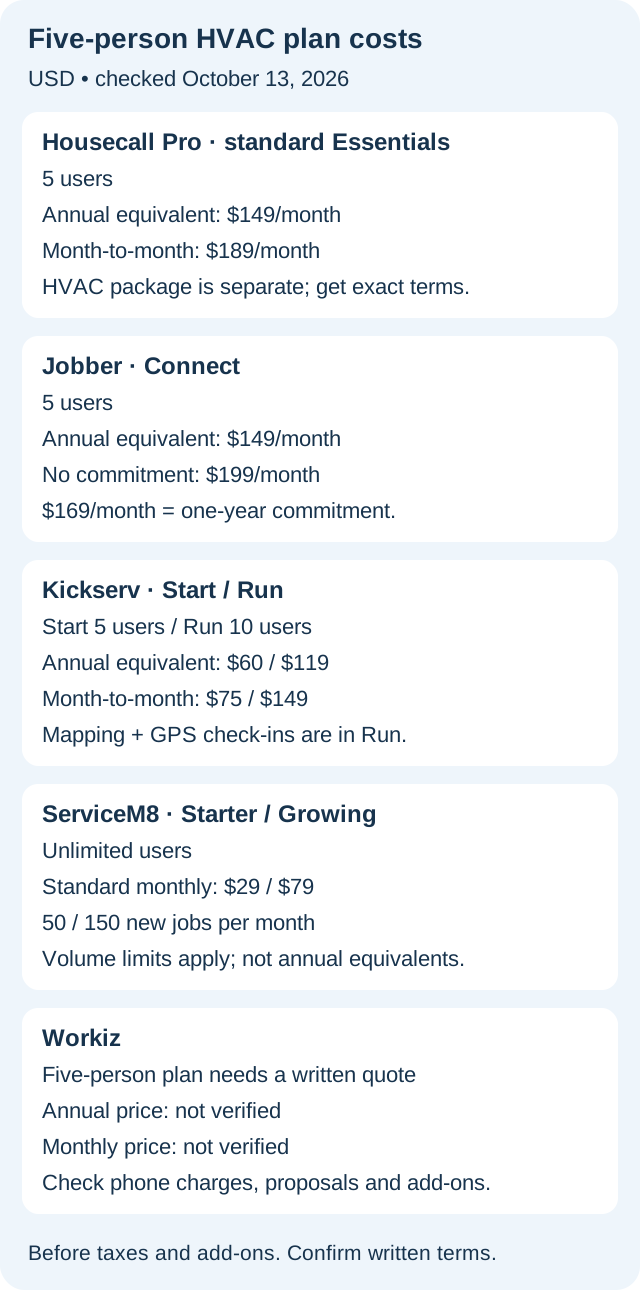
Best for: A small HVAC office moving multiple service calls during the day. Evidence: Hands-on scheduling, assignment and rescheduling. Pricing visibility: Standard Essentials team plan is listed at $149/month when billed annually for five users, or $189 month-to-month. The separate HVAC Essentials team package is listed at $299/month for five users; confirm its billing terms and modules.
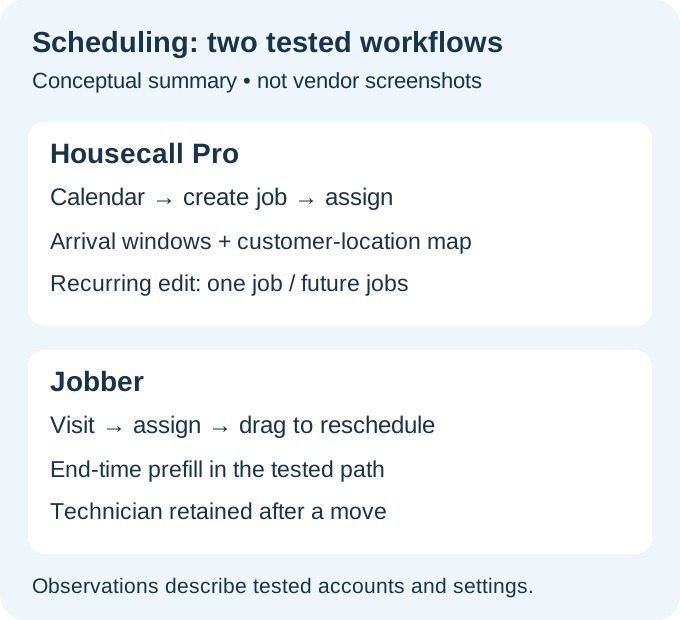
In our tested account, Housecall Pro made Schedule easy to reach. The dispatcher could create a job from the calendar, use day/week/month views, and schedule before assigning a technician.
Customer, address, line-item and estimate context stayed with the job. The address appeared on a map, and arrival-window scheduling helped when an exact arrival minute was unrealistic.
What to watch
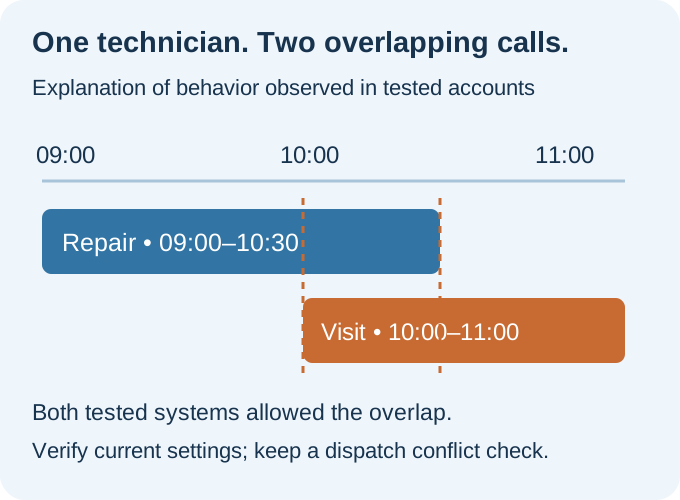
We deliberately assigned overlapping work to the same technician. The tested account did not warn or block the overlap. Check availability before confirming a visit.
New technicians needed an invitation through team setup. After setup, assigning multiple technicians was straightforward and appeared immediately in Schedule.
Rescheduling was clean. The assigned technician stayed with the job, and customer notification was available. On recurring work, Housecall Pro explicitly offered Only this job or This job and all future jobs. That is a meaningful distinction for maintenance visits: a one-off change should not silently move the whole series.
Calendar-first access, arrival windows, clear recurring-edit scope.
Overlap allowed in test; HVAC package differs from standard Essentials.
2. Jobber: strong scheduling inside the wider office workflow
Best for: A small HVAC company where the owner wants estimates, jobs, visits, invoices and recurring work in one operational flow. Evidence: Hands-on assignment/rescheduling and workflow comparison. Pricing visibility: Connect for five users is $149/month billed annually, $169/month with a one-year commitment paid monthly, or $199/month without commitment.
Jobber let us schedule first and assign later. After entering a start time, it prefilled or estimated an end time; Housecall Pro required manual selection in the tested path.
We rescheduled by editing a Jobber visit or moving it on the calendar. The technician stayed assigned, the original slot was replaced, and customer notification was optional. Recurring visits could be changed individually or for future visits.
What to watch
Our intentional Jobber overlap was not hard-blocked. The calendar showed both visits but did not stop double-booking, so dispatcher checks remain necessary.
Adding a brand-new technician required leaving the assignment workflow for Settings / Manage Team. That is an onboarding step, not a day-to-day blocker once staff are configured.
Compare Jobber Connect for five users with five-user plans elsewhere, not its one-user teaser price. $169/month is a one-year commitment, not cancel-anytime billing.
Assignment and drag rescheduling fit the wider job workflow.
Overlap not hard-blocked; a new technician needs team setup.
3. Kickserv: attractive team price, but check the plan you actually buy
Best for: A price-conscious HVAC owner willing to verify plan-level scheduling features during a trial. Evidence: Limited hands-on on a Premium trial, not a completed Start-plan benchmark.
Kickserv felt relatively easy to navigate in our broader job workflow test, including estimate-to-job handling. That makes it worth evaluating for a small team. But a smooth Premium trial is not proof that the same workflow and dispatch tools are included in Start.
Kickserv pricing lists Start: five users, $60/month annual equivalent or $75 month-to-month; Run: ten users, $119 annual equivalent or $149 monthly. Dispatch mapping and GPS check-ins are in Run. Monthly prices were checked using the official billing toggle on October 13.
Published five-user entry tier and a 30-day trial.
Premium trial does not establish Start parity; mapping requires Run.
4. ServiceM8: low monthly price with a job-volume decision
Best for: A small shop whose job count stays within a predictable monthly allowance. Evidence: Official-source research only; no equivalent hands-on scheduling run.
ServiceM8 publishes scheduling, staff assignment and mobile job updates as core functionality. Its US pricing lists Starter at $29/month with unlimited users and 50 new jobs per month, and Growing at $79/month with 150 jobs per month. This is a different billing model from Jobber and Housecall Pro: the constraint is job volume, not the number of staff logins.
Compare Starter for roughly 35 jobs monthly; at 120 calls, evaluate Growing. The 50-job allowance must stay beside the $29 price.
Check technicians' actual devices, offline behavior, assignment updates and customer notifications in a trial. We have not tested those workflows ourselves.
Unlimited users on paid plans; clear job allowances.
Volume determines the tier; no matched hands-on test.
5. Workiz: consider when calls and dispatch are one problem
Best for: A team that wants to evaluate phone handling, lead capture and technician dispatch together. Evidence: Official-source research only.
Workiz lists scheduling, jobs, invoices and estimates in Standard. Pro adds Genius scheduling; Ultimate adds service plans and sales proposals. These are vendor claims, not matched hands-on results.
Workiz's current page requests pricing rather than publishing a verified five-user figure. Get a written quote covering users, phone charges, automations, estimate/proposal limits and add-ons. No numeric quote limit is asserted here.
Published plan distinctions for scheduling automation and proposals.
Five-user price needs a quote; no matched hands-on test.
The scheduling test I would run before paying
Open a trial, if available, and use realistic dummy customers. Give the office three calls: a morning repair, a longer replacement estimate and an afternoon maintenance visit. Assign two technicians, then move the morning repair into a slot already occupied by one of them.
Check overlap warnings, visibility of double-booked technicians, and whether dispatch requires leaving the calendar. Reschedule one recurring visit and inspect later visits. Confirm exactly what customers receive.
Repeat the exercise on a phone with the technician account. If the schedule looks good on a desktop but technicians cannot reliably see changes, the workflow has not passed.
Check owner, dispatcher and technician permissions separately. Our scheduling benchmark is not a complete security audit.
Prices below were checked October 13, 2026. USD before taxes and add-ons. Annual equivalents require annual billing. Standard Housecall Pro pricing does not establish HVAC-package entitlement.
How much should a five-person HVAC team budget?
| Vendor / plan | Published comparison basis | Important qualification |
|---|---|---|
| Kickserv Start | $60/mo annual equivalent; $75 monthly · 5 users | Run: $119 annual equivalent / $149 monthly, 10 users; mapping in Run |
| Housecall Pro Essentials (standard) | $149/mo annual equivalent; $189 monthly · 5 users | Separate HVAC/Mechanical pricing exists |
| Jobber Connect | $149/mo annual equivalent · 5 users | $169/mo one-year commitment or $199/mo no commitment |
| ServiceM8 Starter | $29/mo · unlimited users | 50 new jobs per month; compare higher tier for busier shops |
| Workiz | Quote required | Plan/add-on fit not independently priced |
Should you pay monthly or annually?
During evaluation, flexibility has value. Run real scheduling scenarios before committing a year of subscription fees. Once the workflow is proven and the annual discount is meaningful, an annual plan may be sensible.
Avoid casually cancelling a working system for a lower introductory price. Customer history, maintenance schedules, estimates, invoices and team habits create migration work. Export a sample and reproduce a real dispatch week before switching.
Final verdict: pick the workflow, not the longest feature list
Start with Housecall Pro if your office lives in the dispatch calendar. Trial Jobber alongside it if scheduling is only one part of a larger quote-to-invoice workflow. Check Kickserv's actual plan when price matters, and consider ServiceM8 if its monthly job allowance matches your volume. Request a Workiz demo and written quote if call intake and dispatch need to be evaluated together.
FAQ
Which HVAC scheduling software is best for a five-person team?
For a calendar-first workflow, Housecall Pro is our first trial recommendation based on our own tests. Jobber is a strong alternative when estimates, invoices and recurring service are equally important. Neither should be treated as proven conflict-proof.
Does Jobber automatically prevent double-booking?
Not in the tested workflow. We deliberately overlapped a technician's visits, and the assignment was not hard-blocked. Settings and product behavior can change, so verify the current trial before relying on conflict alerts.
Does Housecall Pro handle recurring maintenance rescheduling?
In our test, yes. It explicitly asked whether to change only the selected job or that job and all future jobs, helping avoid accidental series-wide edits.
Is ServiceM8 really $29 for unlimited staff?
Its published Starter tier lists $29/month and unlimited users, but limits new jobs to 50 per month. Evaluate the tier by job volume, not only headcount.
Can I use Kickserv Start for dispatch mapping?
The vendor currently lists dispatch mapping under Run. We did not validate Start's full feature set in our Premium trial, so verify the exact plan before buying.
For deeper evidence, read Jobber vs Housecall Pro, Jobber Alternatives, Housecall Pro Alternatives, our scoring methodology and the Best HVAC Software guide.
New small-team guide: Best HVAC Software for Small Business compares the 2–5 person buying decision, team pricing, workflow fit and switching costs.