
Best Housecall Pro Alternatives in 2026: 6 Options for Service Businesses
Last updated: September 30, 2026
I tested Housecall Pro and Jobber hands-on, then scored both against our standardized 3-person HVAC scenario: owner, office/customer service, and technician. The decision turned on billing, dispatch, process control, and team size.
Quick Answer
Jobber is the closest HCP alternative I tested for a small service team, especially when multiple invoices from one job matter. ServiceM8 is the budget-first test for a solo or one- to two-person operation.
Workiz, FieldPulse, FieldEdge, and ServiceTitan require a quote or a more sales-led evaluation. I would not switch from HCP unless the specific workflow problem outweighs migration and retraining.
Quick comparison
| Product | 3-Person HVAC Fit Score | Best fit | Pricing visibility | Why I would consider it | Evidence |
|---|---|---|---|---|---|
| Jobber | 84.5 / 100 | Small teams wanting a close HCP alternative | Public pricing | More flexible invoicing / progress-billing workflow | A · Full hands-on |
| ServiceM8 | Score pending full test | Solo / 1–2 person businesses | Public pricing | Very low entry cost while keeping the core workflow | B · Partial hands-on |
| Workiz | Score pending hands-on test | Dispatch / communications-heavy teams | Request pricing | Interesting office-side communications positioning | Limited access + research |
| FieldPulse | Score pending hands-on test | Growing trade teams | Custom quote | Pricebook, job costing, profitability depth | C · Vendor-verified |
| FieldEdge | Score pending hands-on test | Established multi-truck HVAC / plumbing / electrical | Request pricing | Trade-specific operational depth | C · Vendor-verified |
| ServiceTitan | Score pending hands-on test | Larger / operationally complex trades businesses | Request pricing | Broader operational platform for scale | C · Vendor-verified |
Start with budget, not features
Use public pricing to narrow the field; keep quote-only products unpriced until a vendor gives you a current offer.
| Monthly budget | Products I would look at first | What this means |
|---|---|---|
| Under $50 | ServiceM8 Starter | Low-cost core workflow, but tighter job-volume and feature limits |
| $50–$100 | ServiceM8 / Housecall Pro Basic | Low-cost multi-user flexibility vs a more structured HCP workflow |
| $100–$200 | Jobber / Housecall Pro / higher ServiceM8 tier | Workflow preference starts to matter more than headline price |
| $200–$400 | Higher Jobber / HCP plans | Public pricing can be mapped to this budget directly |
| Quote required / budget unknown | Workiz / FieldPulse / FieldEdge / ServiceTitan | Do not place these in a budget band without a current vendor quote |
Workiz, FieldPulse, FieldEdge, and ServiceTitan require vendor contact. Their true budget fit remains unknown without a quote.
If your budget is capped at $50: ServiceM8 is the obvious product to test first
- Best for
- Solo operators and one- to two-person businesses with an Apple-heavy setup and a tight budget.
- Evidence
- Quick hands-on test. The Starter plan's current public price and limits were checked separately on the official site.
- Why consider
- At $29/month, it covered the core customer → quote → schedule → job → invoice → payment → follow-up path in my test.
- Watch out
- I found looser process control than Jobber or HCP. Starter caps new jobs, and advanced asset/forms/reporting and profitability tools are limited.
- Takeaway
- Test it first under $50, but check current job-volume limits and whether handoffs still work as your team grows.
See plan capabilities and limits
Starter lists unlimited users and up to 50 new jobs per month. Its core path includes customer and job management, scheduling, quotes, invoices, recurring work, payments, reminders, and two-way messages.
It also lists deposits and progress invoicing, signatures, feedback requests, dispatch basics, templates, accounting integrations, API access, two-step authentication, and an activity log.
Advanced asset management, forms, proposals, bundles, Inbox, deeper job profitability, and markup billing are not the reason to choose this entry plan. In a larger team, the looser handoffs I saw could make missed steps easier.
Check current ServiceM8 plan limits.
Jobber: the closest alternative I can compare from hands-on use
- Best for
- A small team considering a close HCP substitute, especially for deposits or progress billing.
- Evidence
- Full hands-on: both products went through the same ten-task service-business workflow.
- Why consider
- Jobber created multiple distinct invoices from one Job and felt more structured for some quote-to-job work.
- Watch out
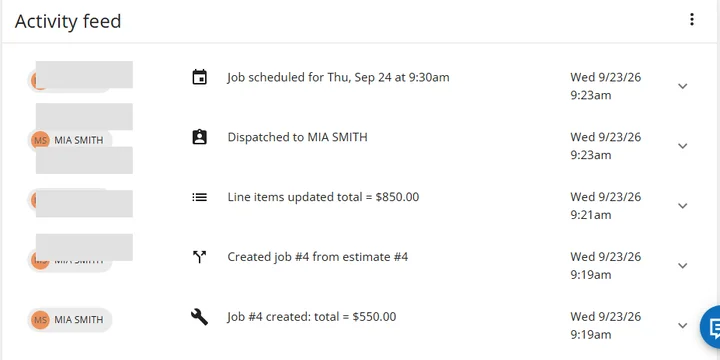
- HCP felt quicker to me in the Schedule. Its test invoice revised the same live Invoice #1 rather than creating another independent invoice.
- Takeaway
- If Jobber is already on your shortlist, see my Jobber vs Housecall Pro comparison for the matched workflow evidence.
Workiz: interesting product, frustrating buying experience
- Best for
- A dispatch or communications-heavy team willing to request a quote and demo.
- Evidence
- Signup and buying-friction evidence. I could not reach a usable hands-on trial.
- Why consider
- Its public positioning emphasizes calls, messaging, dispatch, and office communication.
- Watch out
- Pricing requires contact. I cannot claim it makes a dispatcher faster than HCP without testing that workflow.
- Takeaway
- Advance it only if a quote and live demo prove a material improvement.
Review Workiz pricing information.
FieldPulse: when job economics start to matter more
- Best for
- A growing trade team that needs to understand job profitability.
- Evidence
- Official product and pricing-source research; no hands-on test in this comparison.
- Why consider
- Pricebook, job costing, profitability, and management visibility deserve investigation.
- Watch out
- A two-person business may add overhead before it needs this depth. Pricing requires a current quote.
- Takeaway
- Ask for a demo using your own margin and pricebook questions.
Review FieldPulse pricing information.
FieldEdge: more relevant once the business becomes a real multi-truck operation
- Best for
- An established multi-truck HVAC, plumbing, or electrical operation.
- Evidence
- Official product and pricing-source research; no hands-on test in this comparison.
- Why consider
- Trade-specific depth may suit a dispatcher, service agreements, and stronger reporting needs.
- Watch out
- This could be unnecessary overhead for a tiny team. Request Pricing means I cannot place it in a budget band.
- Takeaway
- Evaluate it when operational structure matters more than keeping software light.
Review FieldEdge pricing information.
ServiceTitan: not the “cheap HCP alternative”
- Best for
- A larger, more process-heavy trades company that may have outgrown an SMB system.
- Evidence
- Official product and pricing-source research; no hands-on test in this comparison.
- Why consider
- Broader reporting, technician management, and operational controls may justify investigation at scale.
- Watch out
- Implementation and training add work. Per-technician, quote-based pricing leaves actual budget fit unknown.
- Takeaway
- Consider it only if HCP's limits are a real operational problem, not as a cheap substitute.
Review ServiceTitan pricing information.
Customer data and security
Field-service software can contain customer names, phone numbers, addresses, job notes, invoices, payment-related information, employee accounts, schedules, and sometimes location data. I would not treat security as a checkbox.
I would ask whether the product supports 2FA/MFA, encryption, individual staff logins, permissions, activity logs, fast access revocation, documented backup/recovery, and current independent assurance such as SOC 2 or PCI where relevant.
For larger teams, I would ask vendors for current security documentation before signing.
Operational convenience and staff efficiency
Price matters alongside the time staff spend on common work.
Office efficiency
- How fast can a dispatcher create, move, and reassign jobs?
- How many screens are needed to answer a customer question?
- Does information have to be entered twice?
- How quickly can staff find history, unpaid invoices, and upcoming work?
- Do reminders and automations reduce manual follow-up?
Technician efficiency
- How quickly does the next job open on mobile?
- Are notes, photos, signatures, payments, and completion easy?
- How many taps do common tasks require?
- Is the app genuinely phone-friendly?
- Does weak signal create problems?
- Can technicians finish the job without calling the office?
Workflow control matters more as the team grows
A solo owner can carry a loose process in their head; a multi-person team needs clearer handoffs. Check required steps, permissions, activity history, and whether staff can skip or overwrite critical information.
Buying friction is part of the product decision
- Jobber
- Housecall Pro
- ServiceM8
You can get much closer to answering “Can I afford it? Can I use it? Does it fit my workflow?” without talking to sales first.
- Workiz
- FieldPulse
- FieldEdge
- ServiceTitan
The buyer has to involve the vendor earlier. That is not automatically bad, but it increases evaluation time and makes true-cost comparison harder.
Who should stay with Housecall Pro?
Stay if HCP already handles your daily calendar, recurring-job scope, payment guardrails, reviews, and team training well. Moving customer data and retraining staff needs a stronger reason than one attractive competitor feature.
How I would narrow the shortlist
| If your biggest issue is… | I would investigate… |
|---|---|
| Budget under $50 and a one- or two-person business | ServiceM8 |
| Want a close HCP alternative with different invoicing behavior | Jobber |
| Dispatcher / communications workflow is the main problem | Workiz — but only after quote + demo |
| Need deeper job costing / profitability | FieldPulse |
| Established multi-truck HVAC / plumbing / electrical | FieldEdge |
| Large / operationally complex trades business | ServiceTitan |
There is no universal best Housecall Pro alternative. The better choice depends on what you are trying to fix.
FAQ
What is the closest alternative to Housecall Pro?
Based on my hands-on testing, Jobber is the closest alternative in this group because both target small service businesses and cover similar customer, estimate, scheduling, job, recurring-work, invoicing, and payment workflows.
Is there a cheaper alternative to Housecall Pro?
Yes. ServiceM8 currently publishes a much lower entry price. But after testing it, I would mainly consider it for solo and one- to two-person businesses rather than larger teams.
Is ServiceM8 good for a growing team?
I would be cautious. The core workflow is surprisingly complete for the price, but the looser process control I saw in testing becomes more important as more people touch the same job.
Which alternatives publish their prices?
Jobber, Housecall Pro, and ServiceM8 publish pricing publicly. Workiz, FieldPulse, FieldEdge, and ServiceTitan currently require vendor contact for actual pricing.
Should I switch from Housecall Pro?
Only if the problem you are trying to solve is important enough to justify migration, retraining, setup, and workflow disruption.
Pricing and plan structures can change. Re-check the vendor’s official pricing page before buying.
Questions & Reader Experiences
Share your question or experience. Please leave out personal, customer and payment details. Comments are reviewed before publication; links are displayed as neutralized text.
Loading reader comments…
No approved comments yet.