
SMALL-TEAM HVAC · OWNER / DISPATCHER GUIDE
Best HVAC Dispatch Software (2026): What Actually Helps a Small Crew?
Disclosure: Independently tested workflows, standard vendor pricing links, and our affiliate disclosure. No unapproved partnership is claimed.
A dispatcher gets an urgent no-cooling call while two technicians are already booked. The question is not whether the software has a calendar. Can the office see the conflict, reassign the call, tell the technician, and keep the customer informed without losing job details?
For a two-to-five-person HVAC shop, a missed handoff risks a wasted trip, late arrival, or extra office calls. We have not measured any vendor's labor savings. This guide distinguishes what our workflow tests actually showed from dispatch features that still need verification.
Quick answer
Trial Housecall Pro first for an office-led dispatch calendar. In our tested account, jobs could be created from Schedule, assigned to multiple technicians, and moved without losing the assignment. Its address map and arrival windows helped the office. But deliberate overlapping assignments were not blocked. We did not test live GPS, route optimization, or mobile push receipt.
Trial Jobber alongside it if estimates, visits, and invoicing must remain connected to the same job. Its rescheduling retained the assigned technician, but overlap was also allowed in our test. Kickserv Run is a published lower-cost mapping candidate, though our limited trial used Premium. ServiceM8 offers job-volume pricing based on official documentation. Workiz merits a demo if phone intake and dispatch are one workflow; we have no comparable hands-on result.
At-a-glance dispatch comparison
| Product | Best trial scenario | Evidence | Main risk |
|---|---|---|---|
| Housecall Pro | Office reassigns several technicians daily | Hands-on assignment/rescheduling | Tested overlap allowed; live routing unverified |
| Jobber | Owner needs quote-to-job continuity | Hands-on assignment/rescheduling | Tested overlap allowed; staff setup required |
| Kickserv Run | Budget-conscious team wants mapping | Premium trial + Run documentation | Run features not tested firsthand |
| ServiceM8 | Crew with predictable new-job volume | Official-source research | Device, map and notification behavior untested |
| Workiz | Phone-heavy intake and dispatch | Official-source research | Quote and real field handoff unverified |
How we tested
Our existing ten-task benchmark used a fictional five-person HVAC company, covering customer setup, quoting, scheduling, technician assignment, rescheduling, recurring work, invoicing and follow-up. The reusable hands-on dispatch evidence is narrower: assigning technicians, deliberately overlapping appointments, moving visits, retaining assignments, and viewing calendar/address context in Housecall Pro and Jobber.
We did not run an emergency call with real field phones, measure technician acknowledgments, validate GPS accuracy, optimize driving routes, or confirm delivery of customer messages. Kickserv evidence comes from a limited Premium trial, not Run or Start. ServiceM8 and Workiz are official-source research. No dispatch-specific numerical scores or measured savings are claimed.
A map showing a customer's address is not evidence of GPS tracking or route optimization.
Housecall Pro: first trial for a calendar-centered office
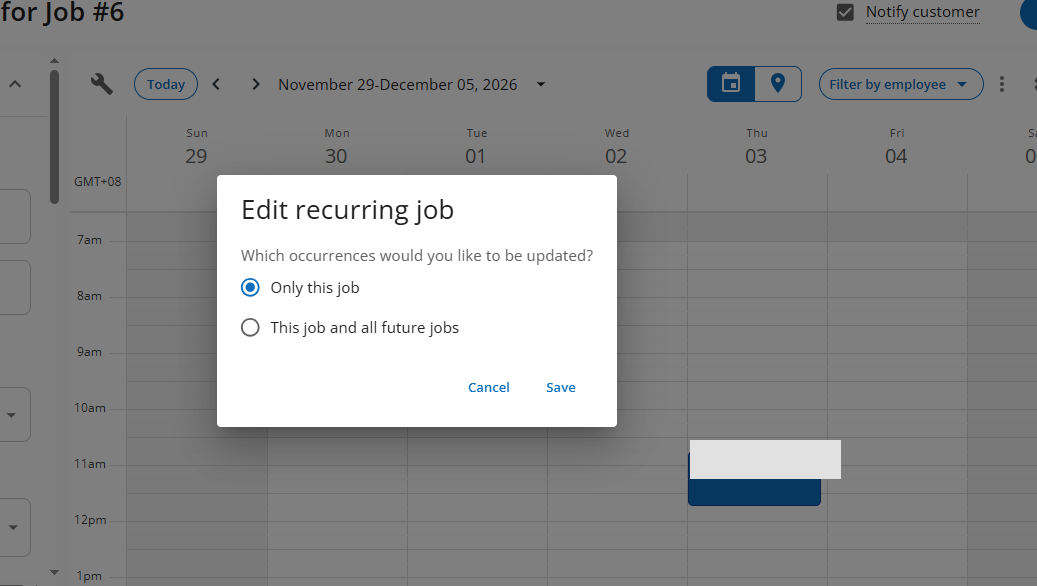
Best for: An office coordinator assigning and moving multiple calls. Evidence: Hands-on assignment and rescheduling; routing claims from vendor documentation only.
In our test, Schedule was easy to reach. We created a job from the calendar, assigned multiple technicians, and saw the customer's address on a map. Arrival windows offered a practical alternative to promising an exact arrival minute.
After rescheduling, the technician remained assigned. The job retained customer and line-item context, reducing one potential office handoff failure in the tested path. However, we did not confirm how quickly the change appeared on a technician's phone.
Watch out: The tested setup did not hard-block deliberate overlapping work for the same technician. A dispatcher still needs a conflict check before confirming an urgent call.
Standard Housecall Pro pricing lists Essentials at $149/month billed annually or $189 month-to-month for five users. It advertises routes and employee GPS tracking on Essentials; route optimization appears on MAX. These are vendor claims, not tested dispatch outcomes. A separate mechanical/HVAC package exists, so obtain a written plan quote rather than assuming standard-tier entitlements.
Decision: Shortlist Housecall Pro when the dispatcher works primarily in the calendar. Require a technician-device reassignment test and a precise route-feature quote.
Jobber: dispatch inside the full job workflow
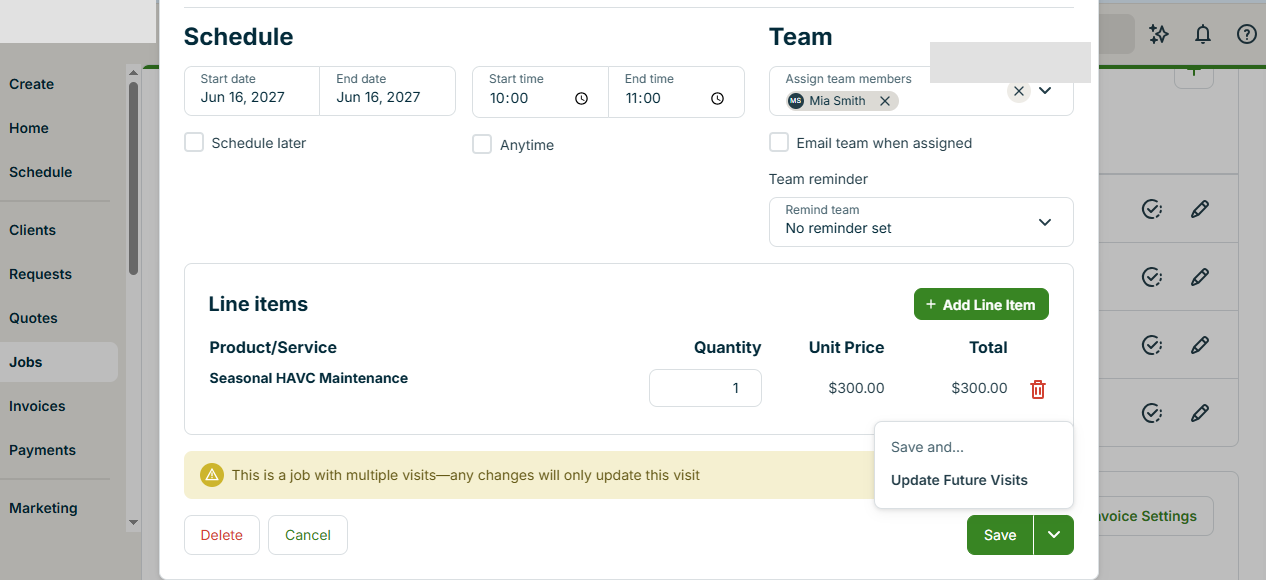
Best for: An owner who needs one job record from quote to visit and invoice. Evidence: Hands-on technician assignment and visit rescheduling.
We scheduled a visit before assigning a technician. Editing or moving that visit kept the technician attached and replaced the original calendar slot. Customer notification was available as an option. The visit stayed linked to the wider job record.
That does not prove a real technician received a push notification. We did not verify delivery on a field device. Adding a new technician also required leaving assignment to configure the team member, a training consideration rather than a routine blocker.
Watch out: Jobber also allowed our intentional overlapping technician visits without hard-blocking them.
Jobber Connect pricing for five users lists $149/month equivalent billed annually, $169/month with a one-year commitment paid monthly, or $199/month without commitment. The commitment changes cash-flow and cancellation flexibility.
Decision: Trial Jobber if keeping estimates, jobs, visits and billing connected is as important as the dispatch board. Test a real same-day change on both office and field accounts.
Kickserv Run: verify the mapping tier, not the teaser price
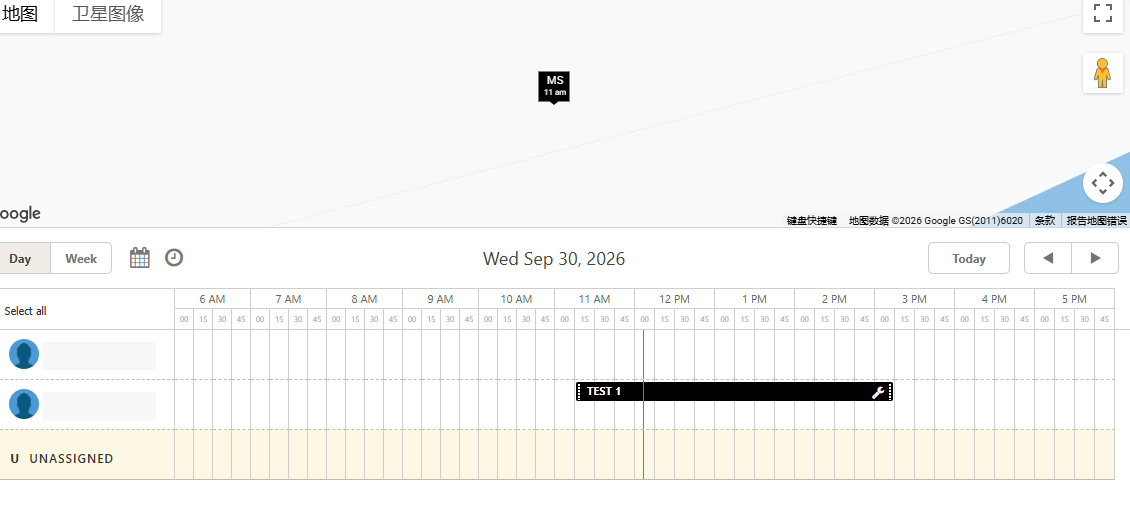
Best for: A price-conscious team prepared to test the paid tier. Evidence: Limited Premium trial plus current official plan documentation.
Our Kickserv trial supplied limited general job-workflow evidence. It did not prove that Start or Run behaves identically to Premium.
Kickserv pricing lists Start at $60/month annual equivalent for five users and Run at $119/month annual equivalent for ten users. Run explicitly adds dispatch mapping and GPS check-ins. The vendor's plan list establishes entitlement, not tested location accuracy.
If mapping matters, compare Run rather than presenting Start's lower price as a mapping solution. Confirm monthly billing, permissions, device compatibility and check-in behavior during a current Run trial.
Decision: A budget shortlist candidate, not a hands-on dispatch winner.
ServiceM8: price by new jobs, not seats
Best for: A small team with predictable new-job volume. Evidence: Official-source research only.
ServiceM8 US pricing lists Starter at $29/month, unlimited users and 50 new jobs monthly, and Growing at $79/month with 150 new jobs monthly. A new job card consumes a credit; converting its quote to a work order does not consume a second credit, according to ServiceM8.
The vendor documents staff scheduling, push notifications and a dispatch map. We have not performed a matched office-to-technician test. Its current US website describes iOS and Android apps; test your actual devices, permissions, offline behavior and notification delivery.
Decision: Consider it when job-card volume is modest, but calculate monthly usage before choosing the tier.
Workiz: demo the phone-to-field handoff
Best for: An office whose biggest issue is converting incoming calls into assigned work. Evidence: Official-source research only.
Workiz's plans list jobs, scheduling and invoices in Standard; Pro adds Genius scheduling. The vendor requests pricing rather than publishing a verified five-person total. We have not tested incoming-call conversion, reassignment, or field acknowledgment.
Request a written quote separating seats, phone tools, automations and add-ons. In a demo, follow one urgent call through customer record, job creation, technician assignment, revised ETA and confirmation. A call dashboard alone does not prove the handoff.
Decision: A demo candidate when phone intake is the bottleneck, not a verified top dispatch performer.
Five-person cost comparison
| Published basis, checked Nov 3, 2026 | Buying implication |
|---|---|
| Housecall Pro Essentials: $149/mo annual equivalent; $189/mo monthly | Five users; verify separate HVAC package and route entitlements |
| Jobber Connect: $149/mo annual equivalent; $169/mo one-year monthly; $199/mo no commitment | Five users; commitment affects first-year cash outlay |
| Kickserv Run: $119/mo annual equivalent | Ten users; mapping and GPS check-ins listed in Run |
| ServiceM8 Starter: $29/mo | Unlimited users, but 50 new job cards per month |
| Workiz | Written five-person quote required |
USD, before taxes, payment fees and add-ons. Annual-equivalent billing is not cancel-anytime monthly billing. Subscription cost is only part of the decision: consider customer-history export, maintenance records, staff training and operational disruption. Do not assume a promotional trial includes every feature in the eventual paid plan.
The dispatch trial to run before paying
Use fictional customers and two technician accounts. Schedule a repair and maintenance call, then add an urgent no-cooling job overlapping one technician. Have the dispatcher identify the conflict, reassign the urgent call and update the customer.
Ask the technician to open the actual mobile app and confirm the new job, address, notes and timing. Check whether the office can tell that the update was received. Repeat with a cancellation and a late-running technician. If routes matter, distinguish a static address map, location check-in, live GPS, route sequencing and traffic-based optimization.
Finally, repeat with the exact paid plan and staff permissions. Record missed alerts, manual calls and duplicate assignments. These are trial measurements to collect, not outcomes we claim to have achieved.
Who should stay with their current system?
If dispatchers already handle same-day changes reliably and technicians see updates promptly, switching for a lower subscription may cost more in migration effort than it saves. Export sample customers, open jobs and maintenance histories before canceling the incumbent. Keep the current tool until the candidate completes a realistic dispatch day without losing assignments or notes.
For calendar planning, recurring visits and overlap tests, see best HVAC scheduling software. For broader workflows, read Jobber vs Housecall Pro, best HVAC software, and how we score HVAC software.
FAQ
Does dispatch software automatically prevent double-booking?
Not necessarily. In our tested Jobber and Housecall Pro setups, deliberate overlaps were not hard-blocked. Verify current settings and plan behavior in your trial.
Is a dispatch map the same as route optimization?
No. A map can display jobs without calculating an efficient sequence. Housecall Pro publishes route optimization under MAX; Kickserv lists dispatch mapping under Run. Neither was independently tested here.
Which should a five-person HVAC shop trial first?
Housecall Pro for a calendar-led office, Jobber for integrated job continuity, or Kickserv Run when mapping-tier price matters. Consider ServiceM8 for low job volume and Workiz for phone-heavy operations, with their unverified workflows clearly in mind.
Disclosure: Independent editorial analysis. Vendor features and pricing are linked to official sources; hands-on observations are explicitly scoped. No affiliate relationship changes our judgments, and no unverified labor savings are claimed.